
Register for the webinar
(New Developments in Wisenet Finance on 1 October 2026)
Every learner journey has a financial journey running alongside it. From determining what a learner should be charged, through invoicing and payment, to managing changes, debtors and reconciliation, those financial processes need to remain connected to the learner and their enrolment.
Wisenet Finance connects fees, invoices, payments and outstanding balances with the learner activity behind them. This helps reduce manual handovers, improve account visibility and support more efficient operations as you grow.
Start connecting your finance journey today
Wisenet Finance is included as part of your Wisenet subscription, giving you the tools to manage the financial side of the learner journey in the same environment as your learner and enrolment data.
Start with the workflows that matter most to your organisation and expand your use of Finance as your needs grow.
The financial journey through the learner lifecycle
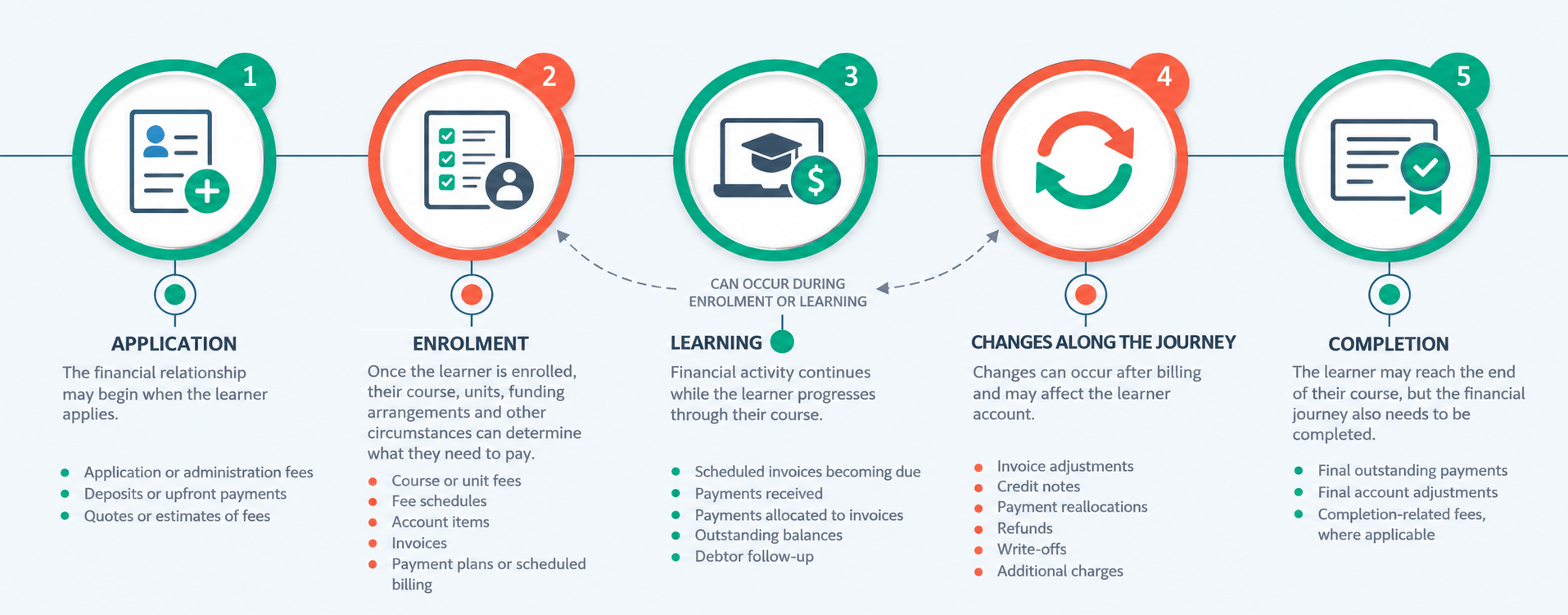
A learner’s financial journey can begin before they are enrolled and continue all the way through to completion.
Depending on how you operate, different learner activities can create different financial transactions. Fees may be charged, invoices issued, payments received, circumstances changed and balances adjusted at different stages of the journey. It can also involve multiple parties, different funding sources and different financial responsibilities around the same learner.

THE CHALLENGE
The challenge is not the number of financial transactions. It is keeping each transaction connected to the learner activity, payer and context that created it.
Here are a few of the challenges that exist:
Learner activity creates a financial action
An enrolment, withdrawal, change or other learner activity may create the need for a charge, invoice, credit or other financial adjustment.
Administration interprets what needs to happen
Staff work out the financial impact by gathering fee information, learner circumstances and the relevant enrolment context.
The financial request is handed off
That information is passed to Finance through an email, task, spreadsheet or another internal process.
Finance recreates the transaction
Finance interprets the information provided and manually creates or adjusts the financial transaction in the accounting system.
The financial story becomes fragmented
The learner activity sits in one system while the financial transaction sits in another. Staff may need to piece together what happened, why a learner was charged, what changed and whether the amount has been paid.
The result is a financial process that depends on handoffs, interpretation and duplicate data entry, rather than following the learner journey itself.
THE SOLUTION
Financial transactions are easier to manage when they remain connected to the learner, enrolment and circumstances that created them.
Here is how Wisenet Finance connects the journey:
Financial activity stays connected to the learner
Fees, invoices, payments and adjustments can be managed with the learner and enrolment context behind them.
Defined finance processes reduce interpretation
Pricing, fee schedules and learner circumstances provide a more consistent basis for determining what should be charged.
Connected workflows reduce handoffs
Learner and finance information can remain in the same environment, reducing the need to transfer context through emails, spreadsheets or separate requests.
Finance does not need to recreate the story
Invoices and other financial activity can be created and managed closer to the learner activity that triggered them, reducing repeated entry and reconstruction.
The learner account stays connected
Charges, invoices, payments, credits, refunds, adjustments and outstanding balances can be viewed together with the learner context behind them.
The result is a more connected financial process, with fewer handoffs, less duplication and clearer visibility from learner activity through to financial follow-up.
What changes when finance is connected?

Wisenet Finance and your accounting platform
Different systems, different jobs
Wisenet Finance is designed to manage the accounts receivable activity that is closely connected to learners, enrolments and education delivery.
Your accounting platform continues to manage the broader financial responsibilities of the organisation.
| Wisenet Finance | Accounting platform |
|---|---|
| Learner and enrolment context | General ledger |
| Fee assignment | Banking and reconciliation |
| Invoice creation | Organisation-wide financial reporting |
| Payments and adjustments | Tax and statutory accounting |
| Debtor visibility and follow-up | Broader accounting controls |
The goal is not to replace the accounting platform. It is to manage learner-related financial activity where the learner context already exists, then support the organisation’s broader accounting processes.
Choose where to begin, using the practical scenarios
We are continuing to build out this section with more supporting resource links.
You do not need to implement every Finance workflow at once. Start with one course, one cohort or one common financial scenario. Configure the fees, follow the transaction from beginning to end, test how your team will manage exceptions, and then expand the model as you build confidence. Here are a few examples.
1
A learner pays their course fees
A learner enrols and is responsible for their own fees.
A possible Wisenet journey
Enrolment
→ Apply the appropriate Fee Schedule
→ Generate or schedule the invoice
→ Receive and allocate the payment
→ Monitor the remaining balance
→ Follow up where required
Good place to start if: your organisation primarily invoices learners directly.
2
An employer pays for training
A learner undertakes workplace or employer-funded training, but the employer is responsible for some or all of the cost.
A possible Wisenet journey
Learner enrolment
→ Apply the relevant fees
→ Identify the Workplace as the debtor
→ Create the invoice in the context of the learner and training
→ Record the employer payment
→ Allocate the payment to the relevant invoice or invoices
→ Monitor the debtor account
Good place to start if: you deliver workplace training or regularly invoice organisations rather than individual learners.
3
A learner has a funded place
The cost of training may be made up of funding, a learner contribution or a combination of both.
A possible Wisenet journey
Enrolment and funding circumstances
→ Apply the appropriate Fee Schedule
→ Record the funded component
→ Identify any amount payable by the learner
→ Invoice the relevant debtor where required
→ Track the resulting financial activity
Good place to start if: your fee arrangements vary depending on funding eligibility or learner circumstances.
4
Money arrives before the invoice
Sometimes the payment arrives before the administrative process that creates the invoice is complete.
A possible Wisenet journey
Payment received
→ Capture the payment against the debtor
→ Leave the amount available
→ Create the appropriate invoice when the financial context is ready
→ Allocate the available payment
5
The learner’s circumstances change
A learner withdraws, changes their enrolment or has another change that affects what they should pay.
A possible Wisenet journey
Learner change
→ Review the original charge
→ Create the appropriate Credit Note or adjustment
→ Apply a discount where relevant
→ Reallocate payments where necessary
→ Process a refund where money needs to be returned
→ Maintain the updated debtor position
Good place to start if: your teams regularly deal with withdrawals, enrolment changes and billing corrections.
Explore Wisenet Finance capabilities
FEES
Define how charges should apply based on the learner, course, units and relevant fee arrangements.
Managing fees starts well before an invoice is created. The first step is defining how your organisation charges for training, how different charges are categorised, and which pricing should apply in different circumstances.
Wisenet Finance gives you a configurable foundation so these rules can be established once and then used consistently throughout the learner journey.
Finance Settings
Set the foundations for how Finance operates in Wisenet, including organisation and document settings, invoice and quote defaults, reporting settings and the email templates used to support financial communication.
Learn more Finance Settings
Pricing Versions
Create and maintain different sets of pricing as fees change over time or vary between Courses and Units. Wisenet retains previous pricing history and allows default Pricing Versions to be set globally or against specific Course Offers and Unit Offers.
Learn more How to Set Up Pricing Versions
Fee Types
Create a consistent structure for categorising charges. Fee Types determine the tax treatment and can carry the relevant general ledger account information used for journal reporting.
Learn more How to Set Up Fee Types
Finance Items
Build a reusable catalogue of the actual charges your organisation uses. Finance Items provide the line items used across financial records such as quotes and invoices, with each item linked to a Fee Type and its relevant pricing.
Learn more How To Set Up Finance Items
Fee Schedules
Bring Finance Items together into fee structures for specific Courses or Units. Fee Schedules can cater for different learner or debtor groups, including domestic, international and partially funded learners, and can be assigned automatically during enrolment or added manually. They can also control whether invoices are created manually or automatically and support staged billing through invoice-by-date rules.
Learn more Fee Schedules
Fundings
Define when training costs are covered externally rather than invoiced directly to the learner or associated workplace. Funding works with Fee Schedules so charges can be structured differently depending on the funding arrangement, while still maintaining a record of the funded amount for reconciliation. Funding records are excluded from journal reporting exports because they are used for reconciliation rather than formal financial reporting.
Learn more Fundings
INVOICES
Turn those charges into invoices at the appropriate point in the learner journey, including scheduled billing where required.
Once fees have been defined and applied, Wisenet Finance provides different ways to move those charges through to the learner or workplace as the debtor. Depending on the your process, this might begin with a quote, move directly to an invoice, or be generated from financial items already sitting against the learner’s enrolment.
Quotes
Create quotes before a financial commitment is confirmed, issue them to workplaces and track their status. Workplaces can view, accept or decline a quote online, and Wisenet can surface those responses through Event Alerts. Once a quote is accepted and linked to a Learner or Workplace, it can be converted into an invoice either manually or automatically.
Learn more Quotes
Invoices
Create and manage invoices within Wisenet, with the debtor recorded as either a Learner or Workplace. Invoices can also be linked to learner enrolments so the financial transaction retains its education context.
Learn more Invoices
Learner Finance Account
The Learner Finance Account brings together Finance Items associated with the learner, along with their related enrolments and invoices. Where a default Fee Schedule applies, Finance Items can be added to the learner account as part of enrolment, creating a clear connection between what the learner is studying and what needs to be invoiced.
Learn more Learner Finance Account
Manage the invoice lifecycle
Teams can search and manage invoices, link enrolments to them and write off invoices where required. This keeps the transaction history within the same Finance environment rather than treating invoice creation as the end of the process.
Learn more How to Search, View and Manage Invoices
Invoice App
When invoices or quotes are sent, workplaces and learners can access them through the Invoice App without needing a Wisenet login. They can view and download documents, pay invoices online, and accept or decline quotes.
Learn more Insight Into Invoice App
PAYMENTS
Capture and allocate payments while maintaining a current view of the learner or debtor account.
A payment does not always need to begin with an invoice. Wisenet Finance allows payments to exist as standalone transactions, giving finance teams flexibility to record money when it is received and allocate it when the appropriate invoice is available.
Standalone Payments
Capture a payment even when there is no invoice available yet, keeping the amount against the relevant debtor until it is ready to be allocated.
Learn more Payments
Manual Payments
Record payments received outside an online payment process so they remain part of the debtor’s financial history in Wisenet.
Learn more Manual Payments
Payment Allocations
Allocate payments to the relevant invoice or invoices for the same debtor, including partially allocating a payment where required.
Learn more Allocate Payments
Payment Visibility
View payment details and allocations so teams can understand what has been received, what has been applied and what remains available.
Learn more View Payments
CHANGES
Respond when circumstances change through credits, refunds, payment reallocations and other adjustments.
Education finance rarely remains exactly as it was originally billed. Learners withdraw, enrolments change, discounts may need to be applied, payments can be allocated incorrectly, and money may need to be credited or refunded.
Wisenet Finance provides different ways to adjust the financial position while retaining the relationship between the original transaction and what happened next.
Credit Notes
Use Credit Notes when an invoiced amount needs to be reduced or reversed. Credits can reflect changes such as withdrawals, fee corrections or other adjustments to an existing charge.
Learn more Credit Notes
Refunds
Return money where funds need to be paid back to the debtor, including situations arising from credits or payments that should no longer remain on the account.
Learn more Refunds
Payment Reallocations
Unallocate a payment from an invoice and apply the available amount elsewhere when the original allocation needs to be corrected.
Learn More Unallocate Payments
Discounts
Apply discounts where the amount a learner or debtor is required to pay changes based on the relevant fee arrangement or circumstances.
Learn more Discounts
FOLLOW-UP
Maintain visibility of what is owed, strengthen financial control and move finance data into the systems that support your wider reporting and accounting processes.
Receiving a payment is not the end of the finance journey. Teams still need to understand what remains outstanding, follow up with debtors, protect financial periods that have been finalised, and make finance data available for broader accounting and reporting.
Wisenet Finance provides the visibility and controls to support that process.
Debtor visibility and statements
Maintain a current view of debtor activity and outstanding balances. Statements provide a consolidated view of account activity and can support communication with learners, workplaces and other debtors.
Learn more Debtor Statements
Aged Receivables
Use Aged Receivable Reporting to understand how long balances have been outstanding and identify accounts that may require follow-up.
Learn more Aged Receivable Reporting
Accounting Period Lockdown
Protect financial periods once processing has been finalised. Locked periods prevent transactions within that period from being changed, while allowing a period to be reopened when a legitimate correction is required and locked again once the correction is complete.
Learn more General Settings
Journal Reporting
Prepare Wisenet Finance transaction data for your downstream accounting processes, helping bridge learner-related financial activity with the organisation’s broader general ledger and reporting requirements.
Learn more Journal Reporting
API and BI Connector
Extend Wisenet Finance data into integrations, data warehouses and reporting environments when you need to use that information beyond Wisenet. The updated BI Connector Finance model also provides allocation data for understanding relationships between invoices, payments and Credit Notes.
Learn more BI Reporting Use Cases