
As part of the upcoming Unit Offer Unification release planned for mid-June 2026, Wisenet is introducing significant improvements to how Units of Study are structured and managed for VSL and Higher Education providers.
These changes are designed to simplify management, improve flexibility, better align with enrolment and delivery workflows, and create a stronger foundation for future enhancements.
This announcement outlines:
What is changing
Units of Study will now be managed as Units
In the new model, Units of Study will no longer exist as a separate standalone structure.
Instead:
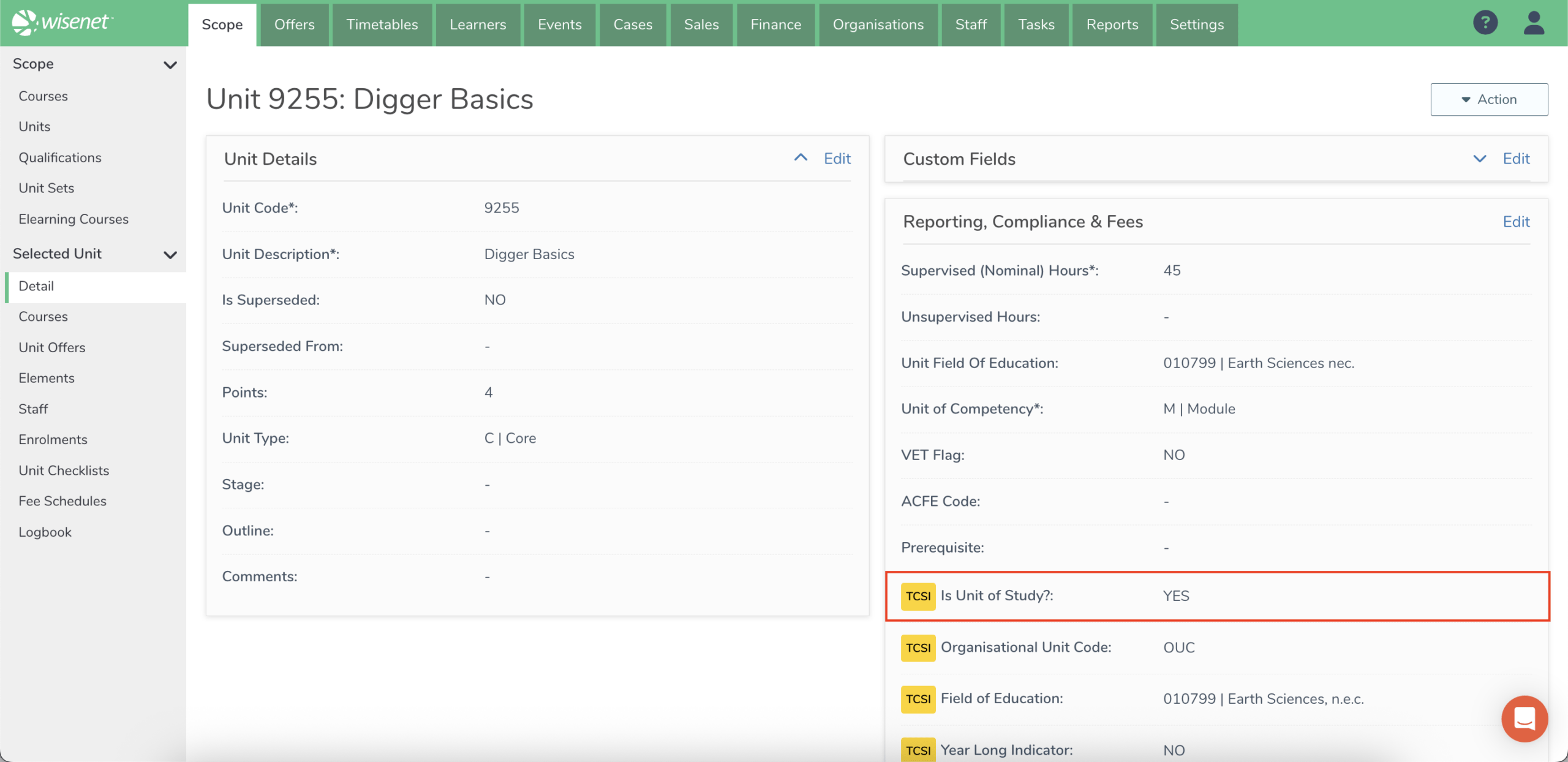
- Units of Study will be created as standard Units
- These Units will be identified using a new “Unit Of Study” flag configured at the Unit level
- When enabled TCSI fields will appear for this Unit and any related Unit Offers and Unit Enrolments
- Unit Offers will then be used to manage hierarchy, enrolment, and delivery relationships
This creates a simpler and more consistent structure across Wisenet because Units of Study will now use the same Unit and Unit Offer model as other delivery structures.
The previous Unit of Study structure was mainly designed for TCSI reporting and was separate from the broader structures used for Units, Unit Offers, Enrolments, Classes, Elearning, and delivery management.
The new model continues to support TCSI reporting while allowing Units of Study to use more connected Wisenet functionality, such as eLearning and bulk updates. It also provides a cleaner structure for Higher Education providers where Units of Competency are not required, allowing Units of Study to be managed as standalone Units without needing a parent-child hierarchy. Lastly, it creates a stronger foundation for future improvements, including linking Timetables, Classes, and other delivery activities more directly to the right structure.
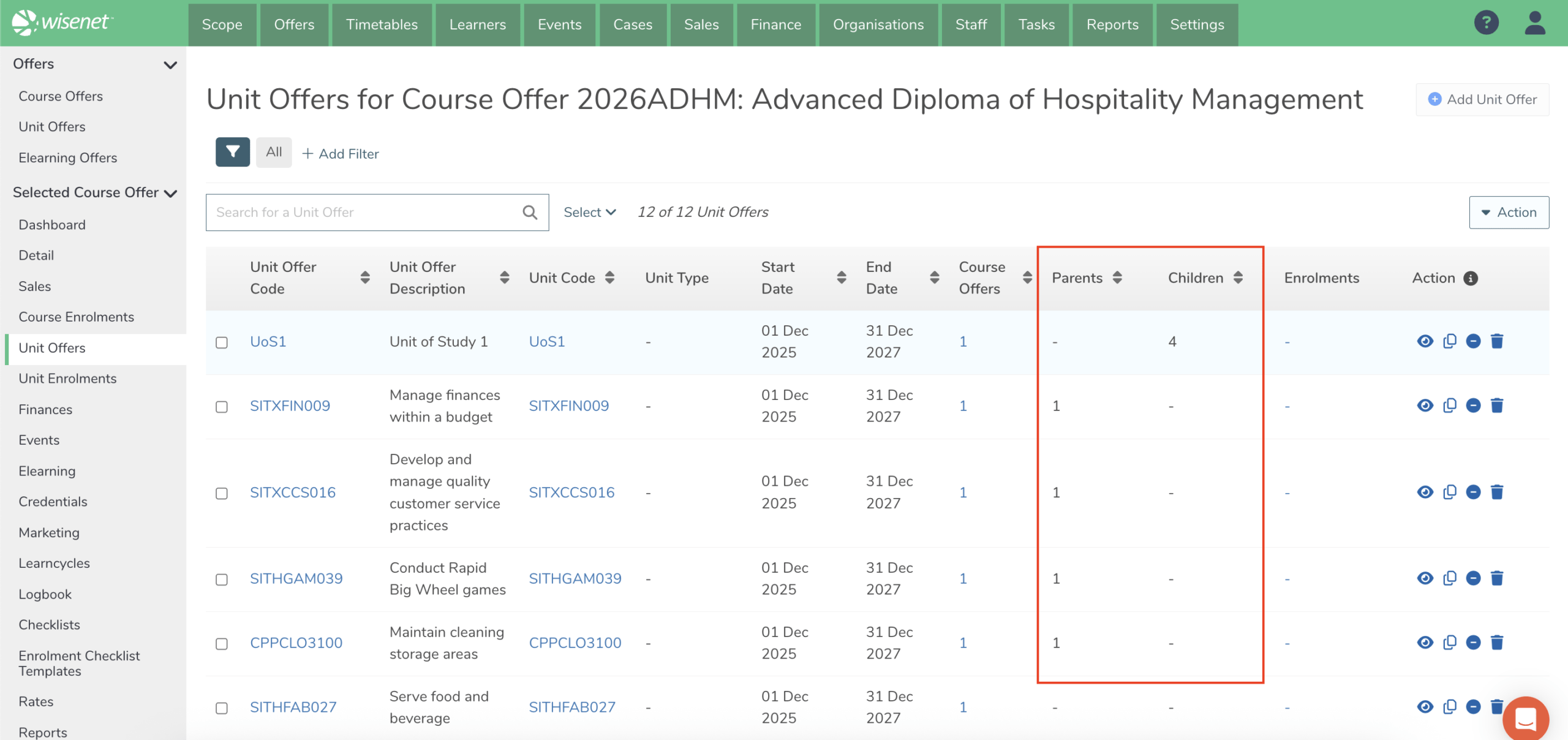
Parent-child hierarchy at the Unit Offer level
Unit hierarchies will now be managed directly through Unit Offers.
For VSL providers:
- Units of Study will sit at the parent level
- Units of Competency can be linked as child Unit Offers
This allows delivery structures to be represented more clearly while supporting enrolment and reporting workflows more consistently.
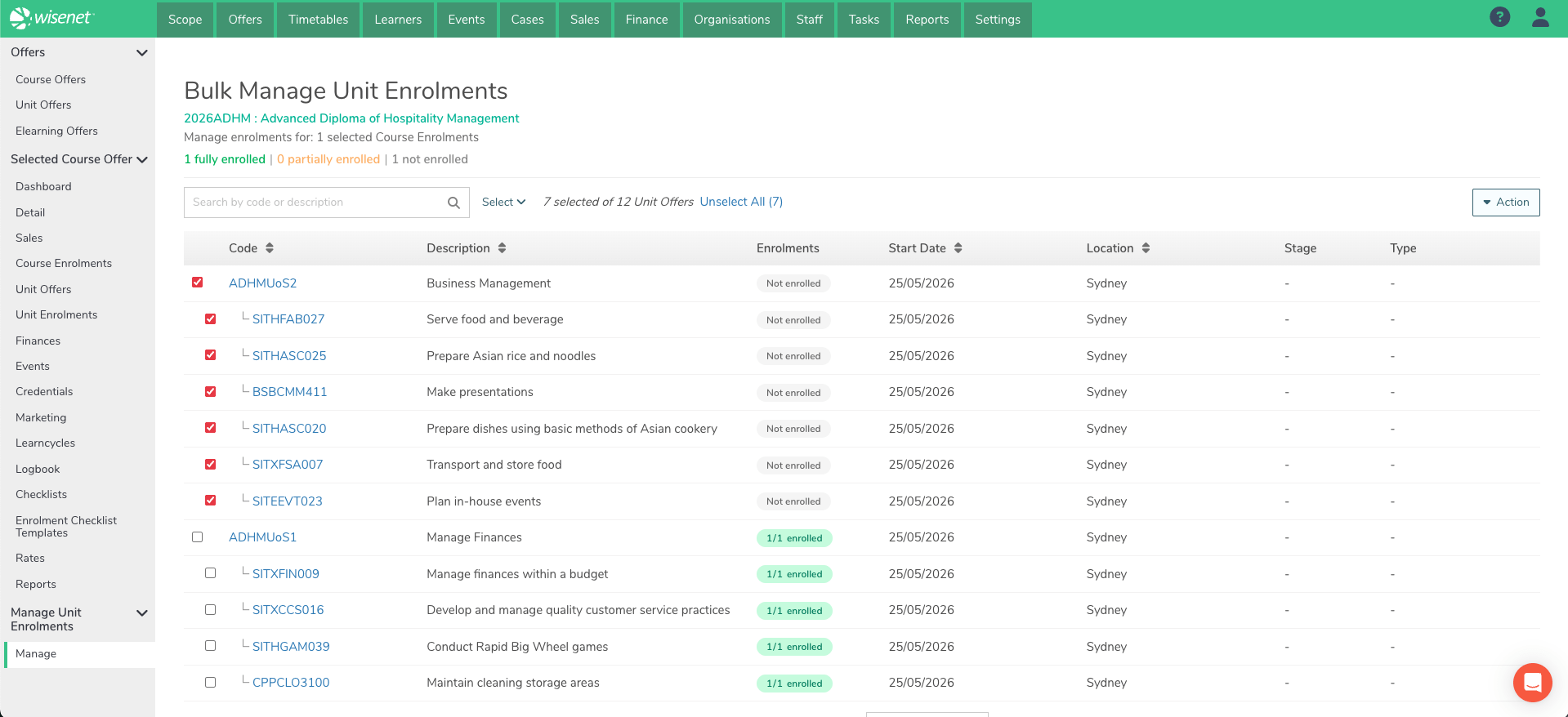
Unit Enrolment add/remove process
The Add/Remove Unit Enrolment flow has been enhanced to support the new Unit Offer hierarchy and the updated Unit of Study process. These improvements provide greater flexibility and visibility when managing learner enrolments.
Users can now quickly add learners into:
- Unit of Study (Parent Unit Offer)
- Unit of Competency (Child Unit Offer)
- or a combination of both
The updated process also clearly displays the units learners are already enrolled in, helping users avoid duplicate enrolments and manage enrolments more efficiently.
Unit of Study Enrolments visible at Unit Offer/Course Offer
You can now view and interact with Unit of Study enrolments directly within the Unit Offer and Course Offer views, now that they are managed as Unit Enrolments.
This enhancement allows users to:
- manage enrolments more efficiently from a central location
- perform bulk updates across multiple learners
- and run quick reports on enrolment activity with greater ease and consistency

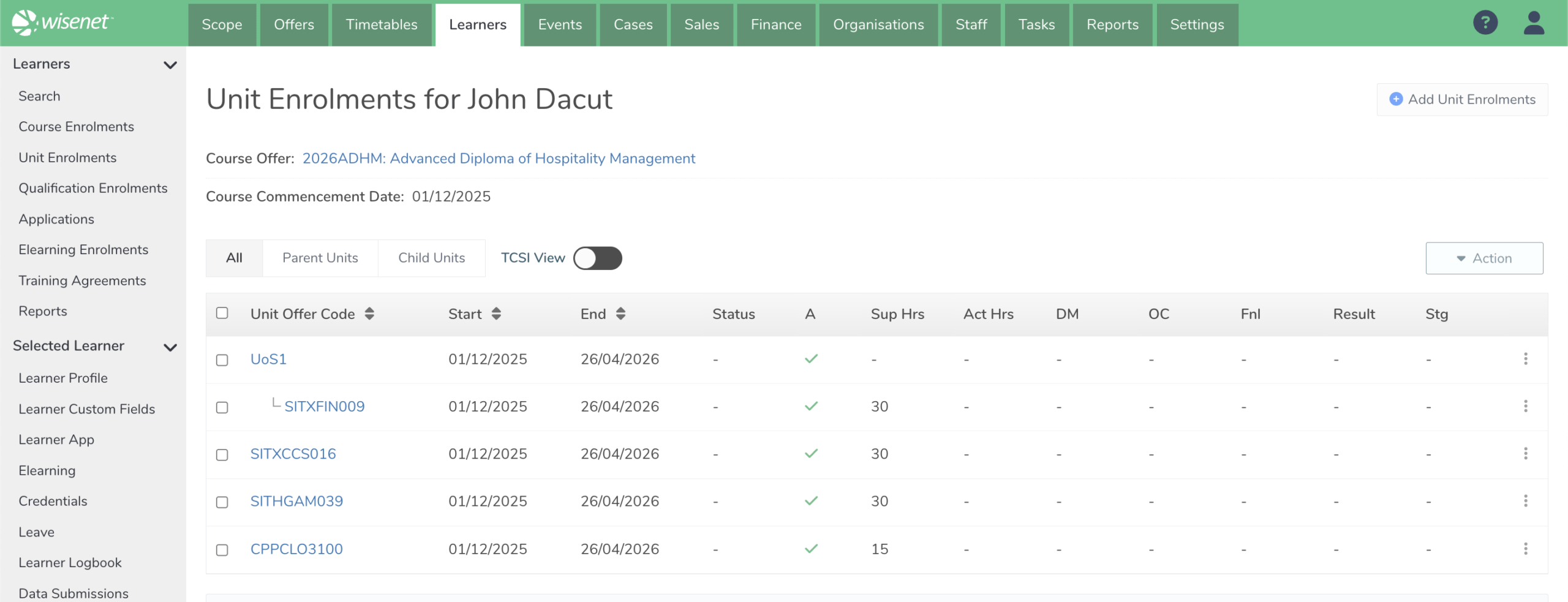
View Unit Enrolments per Course Enrolment
The Unit Enrolment per Course Enrolment experience has also been modernised.
A new toggle option will allow users to switch between:
- a standard Unit enrolment view
- and a TCSI-focused Unit of Study enrolment view
You can also quickly toggle filtering by All, Parent Units and Child Units.
This is designed to improve visibility and simplify day-to-day management for VSL and HE workflows.
Quick Edit Unit Enrolments
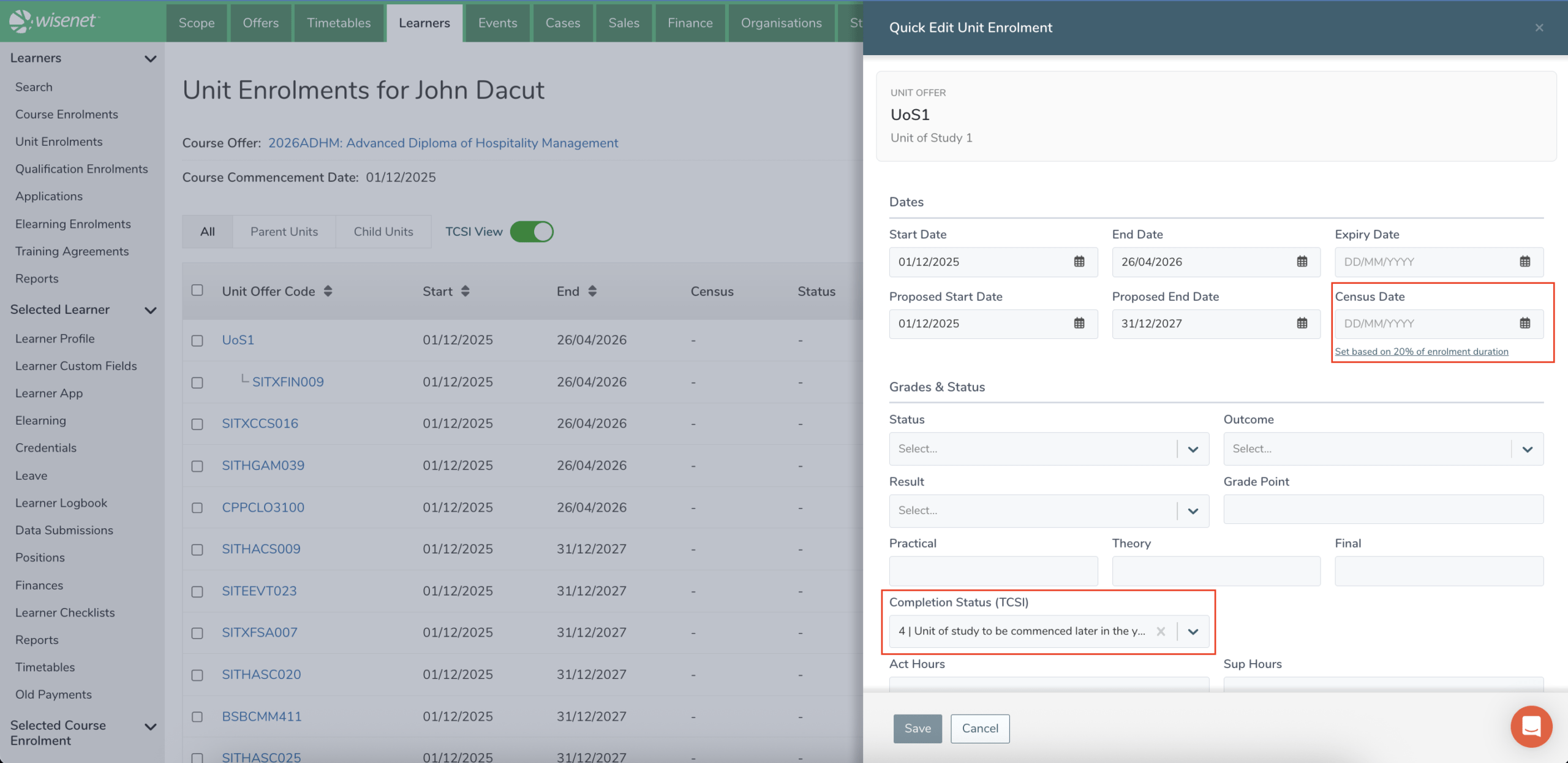
The Quick Edit feature is now a slide out drawer and uses the Unit Enrolment Quick Edit experience with additional TCSI date and completion fields available for Unit of Study enrolments.
TCSI Fee Field Updates
Units flagged as Units of Study will show the additional TCSI fields.
We have opted to split TCSI field management between general Unit of Study delivery and things relating to TCSI Fees.
There is a new Edit TCSI option which opens a new drawer that focuses on managing TCSI fee data. This should feel somewhat familiar from the previous design.

The other Unit Enrolment TCSI fields are available in view/standard edit mode because they share similar properties to other Unit Enrolment fields. See list of fields below:
| TCSI Field (old name) | Mapped Unit Enrolment Field | Existing or New? |
|---|---|---|
| Commencement Date | Start Date | Existing |
| Outcome Date | End Date | Existing |
| Census Date | Census Date | Existing |
| EFTSL Factor | EFTSL Factor | New |
| Completion Status | Completion Status | New |
| Attendance Mode | Attendance Mode | New |
| Remission Reason | Remission Reason | New |
| Course Assurance Indicator | Course Assurance Indicator (VSL) | New |
| Max. Student Contribution | Max. Student Contribution (FH) | New |
Copy Course Offer and Copy Unit Offer
Now that Unit Offers can be shared between Course Offers and allow Unit Offer hierarchy we wanted to ensure that the set up of Course Offers and Unit Offers was as simple as possible moving forward.
The Copy Course Offer and Copy Unit Offer processes have been completely redesigned to allow quicker copies including the copying of related items such as Checklists, Elearning, Sales+, field properties and Unit Offer hierarchy.

What is staying the same
TCSI reporting remains supported
There is no change to how TCSI reporting works as part of this release.
Only the parent Unit of Study will continue to be reported to TCSI.
The updated structure is designed to support this requirement more cleanly and consistently within the platform.
Core enrolment workflows remain familiar
The overall enrolment experience will remain largely the same.
Learners will continue to be enrolled through:
- Course Offers
- associated Unit Offers
- and Unit Enrolments
The primary changes are focused on improving the underlying structure and management model behind the scenes.
What will happen to your existing data
For VSL and HE customers
Your existing Units of Study data will be migrated into the new structure.
As part of the migration:
- Existing Units of Study records at the Course Offer level will be migrated
- New Units will be created with the Unit Of Study flag = True
- New Unit Offers will be created and linked to the relevant Course Offers
- Parent-child relationships will be established between the new Unit of Study Unit Offer and its related Unit Offers based on the previous Unit of Study > Unit mapping
- Existing Unit of Study Enrolments will be migrated into the new Unit Enrolment structure
- Existing Enrolment-related fields will also be migrated into the new model
As part of the migration, Wisenet will create one new Unit for each unique Unit of Study code and description from the old structure. If there were variations in Unit of Study codes or descriptions across Course Offers, customers may see a large number of new Units created at the Scope level. These variations may have been useful at the Offer level, but may not be suitable as a clean long-term Scope-level structure.
These Units will then be linked to their related Unit Offers so they can be managed within the new Unit and Unit Offer structure.
The intended end state is a cleaner Scope-level structure, with a single reference for each Unit of Study wherever possible. To support this, Wisenet will provide a one-time merge process that allows customers to review duplicate or related Units, choose which records should be merged into a clean Unit of Study record, and map the related Unit Offers to the correct Unit. Details of the merge process will be shared closer to release.
For HE customers
For HE providers who currently maintain both Units and Units of Study separately, you will also have a situation where you have Units for both the original Unit and the newly migrated Units of Study and they are essentially the same thing. However one has Unit data and the other Unit of Study data.
This is expected due to the data migration from the old structure to the new structure.
Wisenet will work with you to determine how you would like to structure Units for your HE courses.
Further communication will be provided regarding timing and validation activities.
Summary of Impacted Areas
| Area | Impact | Details | Recommended Action |
|---|---|---|---|
| TCSI Sync | Low | There should be no impact on TCSI syncing as we have designed the migration to have no impact. | Monitor TCSI sync behaviour post release |
| CANs & Invoices | Low | There should be no impact on CANs and Invoices as we have designed the migration to have no impact. | Test uReport process for CANs and Invoices after release |
| Credentials | High | Now that Units of Study will be Units at the Scope level, any credentials referencing Units of Study will need to be updated to report desired Units. | Follow the provided instructions on how to update your credential uReport templates. Then test prior to issuing credentials. |
| Unit of Study Reports | Medium | There will be an impact where Units of Study are currently referenced, as these will now be represented as Units, with the hierarchy managed through Unit Offers. | If you have custom reports that reference Units of Study, please log a support ticket so our team can assist you with updating these custom reports accordingly. |
| Integrations | Medium | Units of Study were not previously available via API. However now that Units of Study will be Units at the Scope level, they may start being included. | Validate any integrations or workflows referencing Units, UnitOffers or UnitEnrolments to determine if you require these records to be included in the integration data. |
How we will support you
We understand this change introduces additional complexity for VSL and HE providers, particularly where existing Unit of Study structures are heavily used.
To support customers through the transition, we will provide:
- detailed Learn resources
- FAQs and workflow guidance
- example structure recommendations
- short how-to videos
- pre-release webinars with live walkthroughs
- post-release migration and validation guidance
Following release, we will also continue communicating:
- when migration scripts are applied
- what validation steps are recommended
- and any actions required from customers
Our goal is to ensure the transition is clear, manageable, and fully supported.
Looking ahead
This is an important structural improvement designed to make managing Units of Study simpler, more scalable, and better aligned with real delivery and compliance workflows.
While there will be some adjustment as customers transition to the new structure, these changes create a more flexible and maintainable foundation for future enhancements across Wisenet.
FAQs
1. Will my Units of Study be migrated to the new structure?
Yes.
For VSL and HE customers, existing Units of Study data will be transitioned into the new Unit Offer model as part of a Wisenet-managed migration process.
As part of the initial Migration Script:
- existing Units of Study records will be migrated into the new structure
- new Units will be created with the Unit Of Study flag = True
- associated Unit Offers and enrolment relationships will be created
- existing Unit of Study enrolment data will be migrated into the new Unit Enrolment model
This process is designed to transition customers into the new structure with minimal disruption while maintaining a clean and manageable hierarchy.
2. Why are Units of Study being transitioned, but Unit Groups are not?
Units of Study have a clear compliance, reporting, and enrolment purpose, which allows them to be consistently restructured into the new model.
Unit Groups, however, have historically been used in many different ways across customers and often do not contain enough meaningful structure to migrate cleanly.
Automatically converting Unit Groups into Units and hierarchies would frequently introduce unnecessary complexity and harder-to-maintain structures.
Because of this, Units of Study can be safely transitioned into the new model, while Unit Groups are being retired in favour of more flexible Unit Offer relationships and categorisation approaches.
3. Will this impact TCSI reporting?
No.
There is no intended impact to TCSI reporting as part of this release.
Only the parent Unit of Study will continue to be reported to TCSI, and the updated structure is designed to support this requirement more cleanly within the platform.
Existing TCSI-related data and enrolment information will be preserved as part of the migration process.
We do recommend monitoring TCSI sync behaviour after release as part of standard post-release validation.
4. Why might I temporarily see duplicate Units or changes in hierarchy after release?
Following the initial release, some customers may temporarily see Units of Study and related Unit Offers appearing at the same level, or duplicate Units appearing within the new structure.
This is expected during the transition period.
After the initial Migration Script is completed, Wisenet will apply a separate Merge Units Script designed to:
- consolidate duplicate Units of Study records at the Scope level
- establish the required parent–child hierarchy relationships
- align structures to the final Unit Offer model
For VSL providers, this process will establish the hierarchy between the Unit of Study and its related Units.
For HE providers, this process will help consolidate duplicate Units and Unit Offers where both Units and Units of Study previously existed separately.
Further communication and timelines will be provided closer to release so customers understand what to expect and when these scripts will be applied.